

Frequently Asked Questions
Frequently asked questions
-
Why is the account blocked?
When a monthly charge fails – for example if the card is blocked or expired – the account is automatically blocked. You cannot start new charging sessions until the debt is paid.
How do I pay my debt?
Open the app and go to Menu > My payment methods.
Check that the card is valid and not blocked.
Replace the card if needed (see the article Adding, changing or removing a payment card).
Retry the charge via the app, or use the payment link feature. A link will be sent to your email and you can pay your debt via a web form.
-
Close your account
You can delete your account directly in the app. Your personal data is handled in accordance with GDPR.
How to delete your account
Open the app and go to Menu.
Tap your name at the top.
Tap the trash can icon in the lower right corner.
Confirm the deletion.
Upon account closure, your personal data is deleted in accordance with GDPR. Charging history and invoices may need to be retained for the period required by law (normally seven years for accounting records).
There is no built-in pause function. If you do not charge, you will not be charged anything. If you are unsure whether you want to permanently close the account, you can simply stop using the service.
-
Forgotten password and login problems in the app
Can't log in to the app? Here are the most common reasons and how to resolve them.
Reset the password
Open the app and tap "Continue with email" on the login page
Enter your registered email address and click the "Forgot your password?" text further down the page.
You will now be taken to a field in the app where you need to enter a reset code. This has been sent to your email. Check the spam folder if the email doesn't appear – it is sent from no-reply@chargenode.eu.
The verification code is valid for 24 hours. If it doesn't work, request a new one through the app. The email may take 5–10 minutes to arrive.
-
Incorrect charge or unknown transaction
If you see a transaction you don't recognize, start by checking your charging history in the app. Please note that we charge your card on the 28th of each month. Payment is therefore not made at the time of charging.
Check your charging history
Open the app and go to Charges > History.
Check the location, date and time for each session.
Also check which email address you are logged in with in the app. You can see this at the top under "Menu". It is not uncommon to log in with Apple ID, in which case you receive a proxy address as your contact address. Login with AppleID is handled as a separate account with its own history.
Historical charges
If a charging box was offline at the time of charging, the session may have been saved locally and charged when the connection was restored. This can explain a charging session that appears to come from an unexpected date.
-
Different price compared to yesterday?
The price of a facility can vary for two reasons: the facility owner has adjusted the price, or a price schedule has come into effect.
Price schedules: Some facilities have active price schedules with different prices depending on the time of day, for example lower prices at night or on weekends. The current price is always displayed in the app just before you start a charging session.
The facility owner has changed the price: The facility owner can adjust the price of their facility at any time. The change takes effect from the next charging session that is started.
Does the price apply for the entire charging session? Yes. The price displayed when you start your session applies for the duration of that session. Any price changes do not affect an ongoing charging session.
-
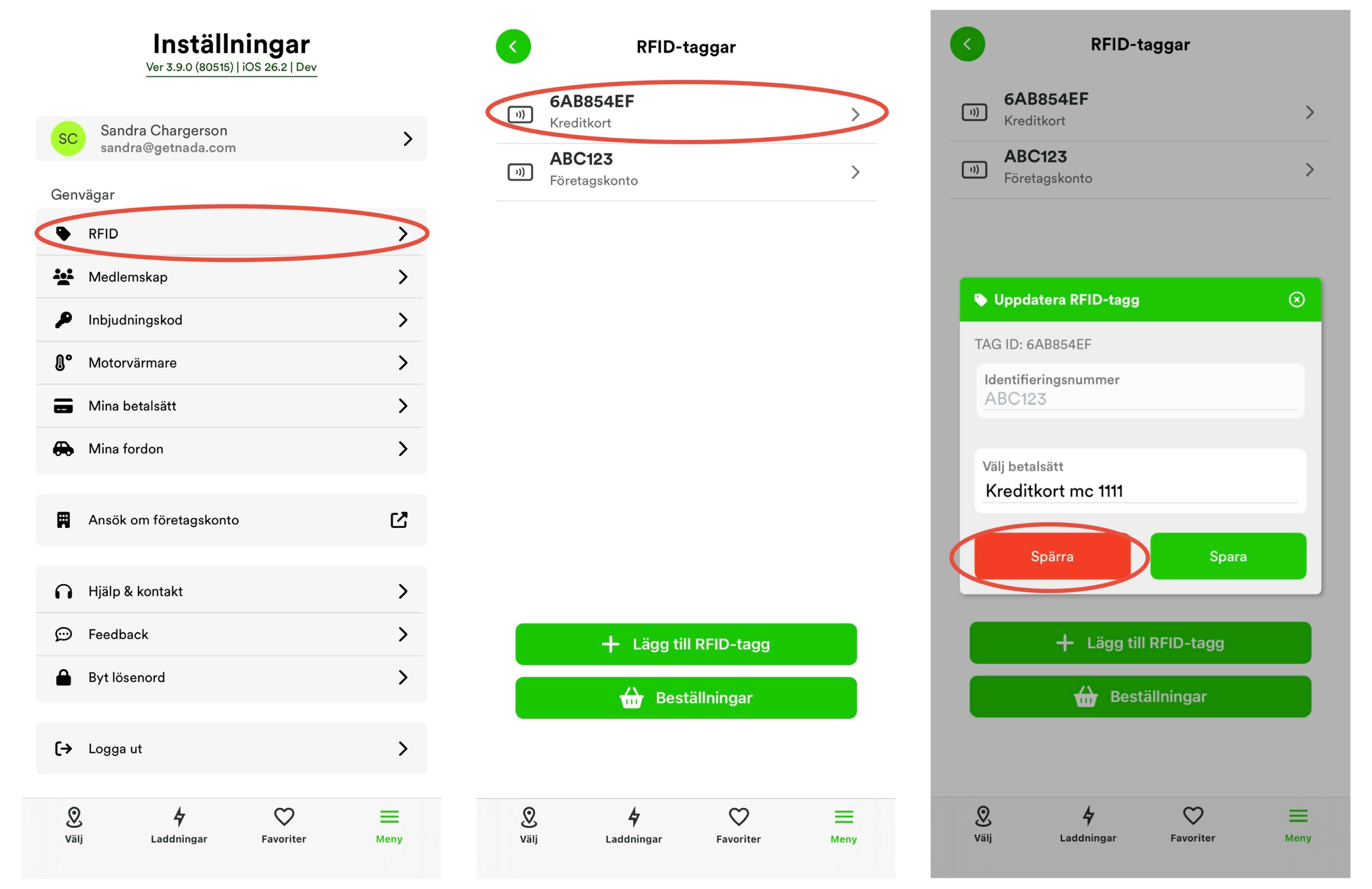
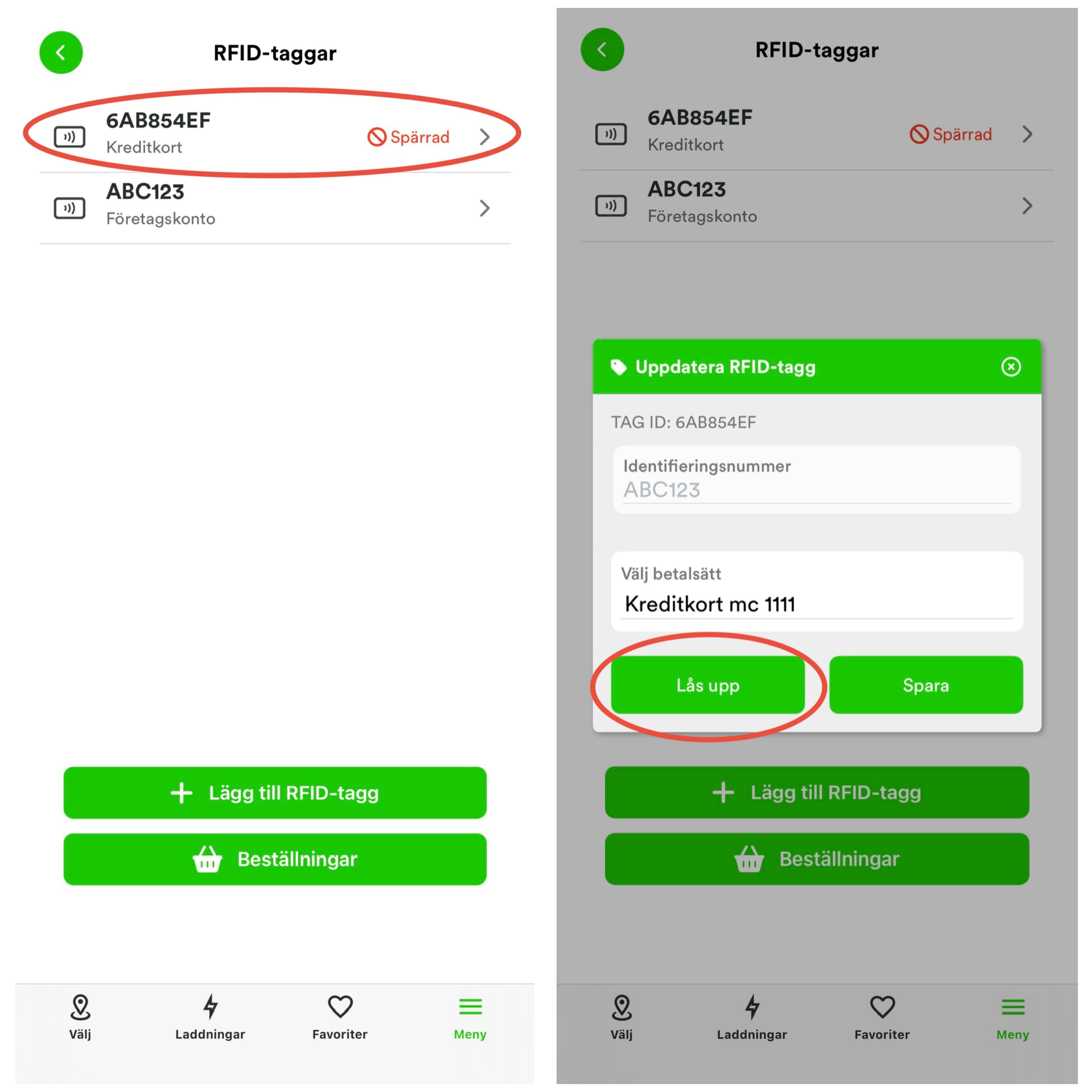
What do I do if my RFID tag is lost?
-
Whatis the charging price?
The price at the facility is always displayed in the app before you start a charging session.
It is the facility owner – for example a housing association, a parking garage, or a company – that determines the price per kWh. ChargeNode provides the platform but does not determine the electricity price.
When you charge your car with the ChargeNode app, you are only charged for the number of kWh that the car receives.
A parking fee may apply and will be charged separately. Please refer to the general regulations/signs in the area for any parking costs.
ChargeNode does not charge any start fees per charging session. In addition to the electricity price, a service fee of 2,50 kr per monthly billing (not per charging session) applies.
Some facilities have price schedules with lower prices during off-peak hours, for example at night. The current price is always displayed in the app.
-
Where do I scan my RFID tag on the charging box?
Most chargers have an RFID symbol that reads your tag. The reader can be located in different places depending on the charger.
Zaptec – A small black round RFID symbol is located in the middle of the box.
Charge-Amps AURA – The reader has no symbol, but is located just below the symbol that resembles a pyramid in the middle of the charger.
Charge-Amps Halo – Directly on the symbol that looks like a pyramid.
CTEK Chargestorm – RFID symbol high up in the middle of the charge box.

-
How do I order a new RFID tag?
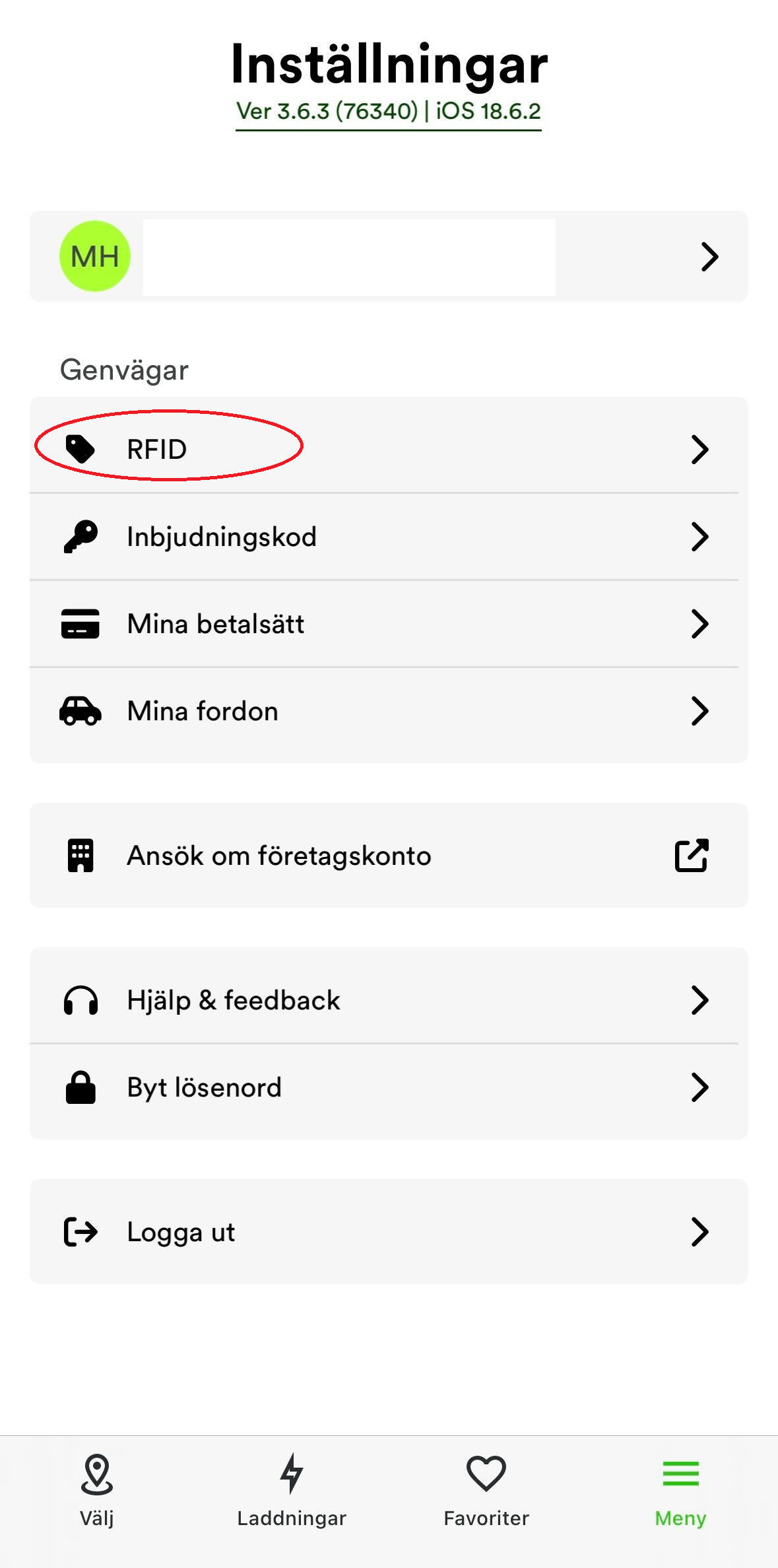
You order an RFID tag in the app for 100kr/piece. Go to Menu > RFID, > New order, fill in the details and pay directly via Apple/Google Pay or debit card.
-
When are my charges billed?
Your charges are collected and billed once a month, always on the 28th. This means you pay for all charges made during the month at one time.
You can monitor your balance and view your charges in the ChargeNode app under Charges > History.
Once the payment is completed, a receipt is automatically sent to your email. If you want to know more about how to find the receipt yourself, see HERE.
-
If charging does not start
Make sure you have the correct area code and location number. If you scan the QR code next to the outlet, you will always get the right location. Sometimes the app has difficulty distinguishing between two areas that are close to each other. In that case, it is important that you check that the correct area code is shown in the app where you have parked.
If charging still does not start
The most common reason why charging does not start is that the cable lock has not engaged. Try the steps below before attempting to start charging via the app/RFID tag.Make sure there is no debris stuck in the cable.
Press the cable firmly into the charger's outlet.
Then start charging via the app/RFID tag
-
Why doesn't charging start immediately and why does it stop after a while?
You have done everything correctly, but have temporarily ended up in a queue. Do not unplug the cable or cancel in the app unless you are leaving the location. The system detects when it is your turn, partly depending on the departure time you entered in the app. ChargeNode does not charge all vehicles simultaneously. Your charging may stop and start several times during a parking session. But we always do our best to ensure everyone gets the charge they need. Want to know more? Feel free to watch our video below (in Swedish only at the moment).
-
What effect can I expect?
Your car determines how much effect it can receive. Most of our charging stations can offer up to 22 kW. The most common is that hybrids can handle 3.7 kW and electric cars 11 kW. If you have connected to a fast charger (DC charging), it can vary between 50 and 150 kW. The power can also be temporarily limited if many people are charging or if something else is drawing a lot of current in the area where you have parked.
The power is therefore affected by the car's onboard charger, type of charging station, and load balancing.
Articles
- Charging and Power – What you need to know as a new electric vehicle owner ChargeNode
- How do I connect an existing RFID tag to my ChargeNode account? ChargeNode
- How do I add a payment card? ChargeNode
- Where do I find the receipt? ChargeNode
- How do I change my payment card? ChargeNode
- How do I pay a failed billing charge? ChargeNode
- Do I need to pay a parking fee when I charge? ChargeNode
- How do I become a member of a Private area? ChargeNode
- Why do I need to enter a departure time? ChargeNode
- Why isn't my car charging fully? ChargeNode